All linux distro are open source by open source means they are free of cost unlike Microsoft windows, where you have to spend big bucks. There are collection of linux distro such as Opensuse, Fedora, Linux mint, Ubuntu, and many more. Linux comes in Gnome and KDE versions. KDE version is for those users who like to have a little graphical look into their computers, where Gnome is less graphical and basic looking Operating System.
 |
| Ubuntu 10.10 KDE Version |
 |
| Ubuntu 10.10 Gnome |
You can download Ubuntu at the following link:
Download Ubuntu. After downloading the image file which will be in ISO format, extract that image file and look for the program/application call "Wubi". This allows you to install Ubuntu Linux on your Computer/Laptop without making any changes to your hard-drive using this application. What does this "wubi" application do? It dual boot you computer with an existing Operating System you are using. While installing Ubuntu 10.10 using wubi application, you will be prompt for certain information such as username, password, language, desktop environment, and how much space would you like to this Operating System on Hard-Drive.
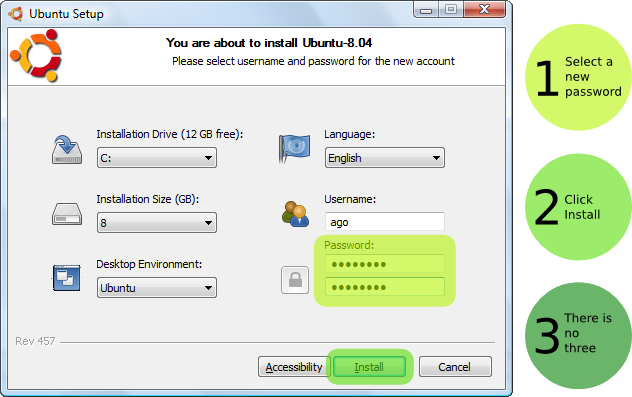 |
| Prompt for installation informantion |
After hit the install, it will take some time and start installing ubuntu on your computer.
 |
| Complete Installation |
After that you will be prompt at another windows, which will ask whether to reboot now or later. Click on reboot now and click finish. When the computer reboots chose "Ubuntu" from the dual option and hit "enter" wait for the installation to complete. Configurations! you finish installing Linux Ubuntu. Its FREE most of all it comes with per-install programs, which you will be using for your daily life basis.


No comments:
Post a Comment